
I love this poster I made of Sienna playing with the hose in our backyard. If you look closely you can see that the picture is actually made up of dots. You can create your own poster from any image very easily and for free!
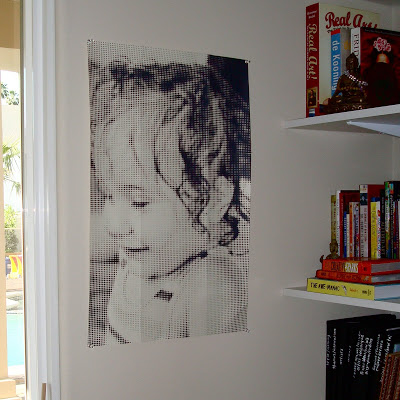
I can’t remember how I happened upon the Homokassu website but it definitely ranks up there as one of my favorites. Their rasterbation program (okay, I’ll admit I cringe when I hear this word…I’m sure they could have come up with a better name) takes any image you upload and converts it to dots. When you are up close looking at the image it just appears to be a series of different sized dots but as you step away you see an image. They explain it better at their site. The cool part is that you can specify how large you want the image to print. For example, if you wanted to cover a wall with an image you would enter your wall dimensions and the program converts your image to 8×10 inch squares that print as a PDF document and you put them together like a puzzle.
Here is a photo I was planning to cover a wall with at our old house in North Carolina. It was rasterized to be 8.5 feet tall.
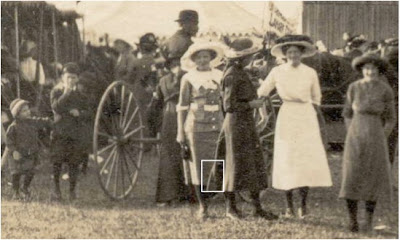
The 8.5 x 10 inch printer output for the small white square I highlighted in the above photo is shown below. The finished image would have taken around 150 pages to print.

Update: I forgot to mention how I hung my poster. I printed it on cardstock which made it much easier to work with and a little more durable. I taped it from the reverse and just tacked it up. You could use spray adhesive if you want it a little more permanent or use silver thumbtacks for the corners. I also thought about putting it under a larger piece of plexiglass and using large industrial screws for the corners. For the large one in NC I was going to use wallpaper paste, but I can’t tell you how that turned out because I never finished it!

That is really really neat. Really.
This is very cool! You are right, what an awful name for their program! I got a good laugh out of it though 🙂
Wow that is so cool – thanks for sharing!
How about "rasterization"? Wouldn't that be a better word?
Do you have a direct link to the site? The link on your post is no longer working. Thanks!
Where do I go to download that program?
appears that the website it down 🙁
This website no longer works. Can you provide an alternative? Thanks!